

Dots that follow the road
Small dots at the edges of your Mac's screen move with braking, speeding up and curves, so what you see matches what you feel in the car, train or bus.
- macOS 14 or later
- Apple silicon
- AirPods with head tracking
One-time purchase, no subscription. Coming to the Mac App Store. Buy here now and get the App Store version at no extra cost later: we email you a code.
How it works
Dots that move with the vehicle
Motion Cues shows what the vehicle does: when you brake, the dots slide up; when you speed up, they slide down; in a left curve they stream to the right. New dots appear at the edge, travel towards the middle and fade away. The middle of your screen stays free for your work.
- Fixed dots in standard size along the left and right edge
- Motion sends extra dots across the edge, more when it moves more
- Shows only while you travel, or always if you prefer
Your AirPods are the sensor
No sensor in your Mac needed
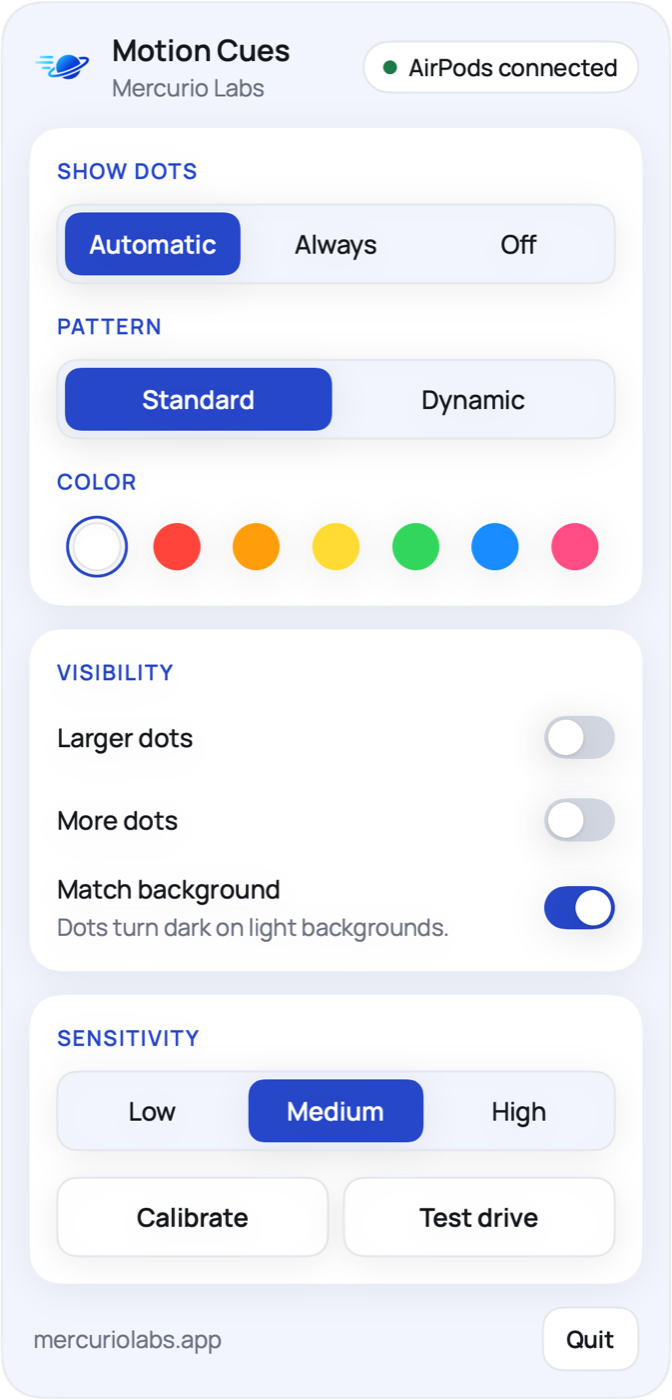
Motion Cues uses the motion sensors in your AirPods, so it works on every Mac with Apple silicon, desktop Macs included. It reads their motion through macOS, filters out quick head turns and nods, and keeps the slow motion of the vehicle. You calibrate once by moving your head forward.
- Works with AirPods (3rd generation), AirPods 4, AirPods Pro (every generation), AirPods Max or Beats Fit Pro
- Quick head movements are ignored
- A test drive shows the dots without travelling
Your look
Calm or lively, in your colour
Choose the Standard pattern for neat rows or Dynamic for freer dots, seven colours, larger dots and more dots. White dots turn dark on light backgrounds, so you see them on any page.
- Patterns Standard and Dynamic
- White, red, orange, yellow, green, blue and pink
- Dots stay out of screenshots and screen sharing
Before you buy
What you need
Motion Cues needs AirPods with head tracking, because it reads the motion of your AirPods. Without such AirPods the app can only show still dots.
A Mac with Apple silicon
Any Mac with an M chip (M1 or later). Intel Macs do not share head motion.
macOS 14 Sonoma or later
Head motion from AirPods reaches Mac apps from macOS 14 on.
AirPods with head tracking
- AirPods (3rd generation)
- AirPods 4
- AirPods Pro, every generation
- AirPods Max
- Beats Fit Pro
AirPods of the 1st and 2nd generation and other headphones do not work.
How it works
Three steps on the road
Buy and download
Pay €4.99 with card, Apple Pay or Google Pay. The download starts on the next page, and you get a receipt by email.
Open and activate
Move Motion Cues to Applications and open it. Paste your license key, allow motion data and calibrate once.
Ride
Work as usual. When the car moves, the dots appear at the edges and move with it.
Questions
Questions about Motion Cues
Do I need AirPods?
Yes. Motion Cues uses the motion sensors in your AirPods. It works with AirPods (3rd generation), AirPods 4, AirPods Pro (every generation), AirPods Max or Beats Fit Pro, connected to your Mac.
Does it work on an Intel Mac?
No. Head motion from AirPods reaches apps only on Macs with Apple silicon (M1 or later) and macOS 14 or later.
Is it a medical product?
No. Motion Cues is a visual aid: dots at the edge of the screen that move with the vehicle, so your eyes see the motion your body feels. How it feels is different for everyone. Do not use it while you drive.
Does it work over full screen apps and videos?
Yes. The dots float above every window, every desktop and full screen apps. Clicks go through them, and they stay out of screenshots and screen sharing.
Does Motion Cues record my screen?
No. When you switch on Match background, macOS itself blends the white dots with what lies behind them, the same way the menu bar adapts to your wallpaper. The app never sees your screen and needs no screen recording permission.
Why does it play sound to my AirPods?
macOS shares the motion of your AirPods only while sound plays to them. Motion Cues plays silence while it runs and stops when your display sleeps. You hear nothing, and your music plays as usual.
Is the download safe?
Yes. Motion Cues is signed with our Apple Developer ID and notarized by Apple, so macOS opens it like any other app. On the first start macOS asks once whether you want to open an app downloaded from the internet; click Open.
Will it come to the Mac App Store?
Yes, Motion Cues is coming to the Mac App Store. If you buy it here, you get the App Store version at no extra cost: we send you a code to the email address you paid with as soon as it is available.
Can I use it on more than one Mac?
One license works on one Mac at a time. To move it, click Deactivate this Mac in the Motion Cues menu on the old Mac, then activate the same key on the new one.
Is my data sent anywhere?
The motion of your AirPods is processed on your Mac and never leaves it. The app has no account and no tracking. It connects to mercuriolabs.app only when you activate or deactivate your license, with the key and an anonymous ID of your Mac. Your payment goes through Stripe.
Can I get a refund?
The download starts right after payment, and you agree that your right of withdrawal ends with it. If Motion Cues does not run on your Mac, write to hello@mercuriolabs.app and we will find a solution.
AirPods, Mac, MacBook, iPhone and macOS are trademarks of Apple Inc. Beats is a trademark of Beats Electronics. Motion Cues is an independent app by Mercurio Labs and is not affiliated with or endorsed by Apple.

Keep working on the road
One-time €4.99 for your Mac. Check what you need, then download right after payment.